EOE-W55RP20 SNMP Module
Overview
The EOE-W55RP20 SNMP module is an embedded Ethernet module that adds SNMP management to your equipment. It is built on the WIZnet W55RP20, which combines an RP2040 MCU and a W5500 Ethernet controller in one package. The host MCU only exchanges AT commands over UART. SNMP processing, SNMPv3 authentication and encryption, and TCP/IP are all handled by the module, so the host MCU does not need a network stack.

Key Features
- SNMPv1, v2c and v3 agent: GET, GETNEXT, GETBULK, SET, Trap and Inform
- SNMPv3 security: SHA-1 / SHA-256 authentication and AES-128 encryption
- Up to 1024 objects, created by number without knowing OIDs or registered at once from a CSV file
- Confirmed SET: the host MCU approves a written value before it is applied
- 10/100 Mbps Ethernet with TCP/IP handled by the W5500 hardware, DHCP or static address, DNS
- 4 TCP/UDP channels for the host MCU, in addition to SNMP
- 61 AT commands and a web interface for every setting
- Firmware update over the web interface or UART, verified before installation
- Diagnostics, watchdog, and factory reset by AT command, web interface or pin
Supported Hardware
This firmware (1.2.0) runs on the following W55RP20-based hardware. To purchase, contact direct@wiznet.io.
| WIZ-IP20 | W232N | EOE-W55RP20 |
|---|---|---|
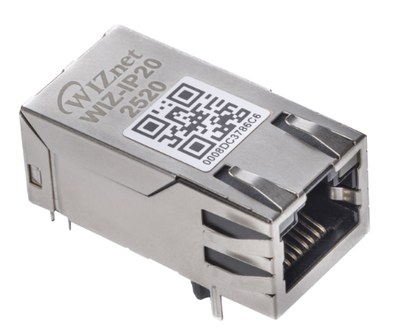 | 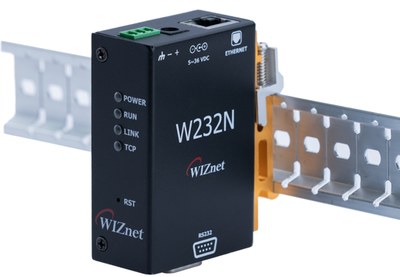 | 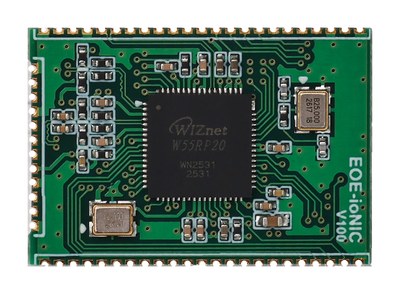 |
| Mag Jack module 3.3 V TTL UART | DIN-rail converter RS-232 (D-SUB9) | Castellated module 3.3 V TTL UART |
Feature Details
- SNMP
- Security
- Objects
- Network
- Configuration & Management
- Firmware Update
- Diagnostics
- Supports SNMPv1, v2c and v3. Only v3 is enabled by default; turn on v1 and v2c when you need them.
- Handles GET, GETNEXT, GETBULK and SET requests.
- Sends Traps and Informs to up to 4 receivers.
- Informs are resent a set number of times until the receiver acknowledges them.
- 11 standard objects such as
sysDescr,sysUpTimeandsysNameare readable from the start, so communication can be checked before any object is created. - The device description (
sysDescr), name (sysName), contact (sysContact) and location (sysLocation) can be set with AT commands or on the web interface, so each device stands apart in a manager's device list.
- Authentication with SHA-1 or SHA-256, encryption with AES-128.
- Three security levels (no authentication or encryption, authentication only, both), chosen per user.
- Up to 4 SNMPv3 users, each with one of four roles: administrator, operator, monitor or notification receiver.
- Passwords are not stored. A forgotten password cannot be recovered; delete the user and create it again.
- v1/v2c communities go through the same access checks as SNMPv3 users. A community never reaches more than a v3 user with the same role.
An object is a single value that a manager reads or writes, such as a temperature, a relay state or a device name.
- Up to 1024 objects, of which up to 128 can be strings.
- Eight data types, including integers, counters, time ticks, strings and IP addresses.
- Each object is set as read-only or writable, and as kept or not kept across reboots.
- Values that trigger a real action, such as a relay, can be made confirmed: when a manager writes the value, the module asks the host MCU first and applies it only after approval.
- Objects can be created by number without knowing OIDs. To register many at once, upload a CSV file on the web interface.
- Whether an object is confirmed, its allowed range, unit, description and default are set in the CSV or one at a time with AT commands, and changing them keeps the object's value.
- 10/100 Mbps Ethernet, with TCP/IP handled by the W5500 hardware.
- DHCP or a static address. DNS is supported.
- Besides SNMP, the host MCU has 4 TCP/UDP channels of its own. Each send carries up to 1460 bytes, and host names can be used to connect.
- 61 AT commands cover all settings. The module also sends unsolicited messages (URCs) when something changes.
- The same settings are available on the web interface, with dashboard, network, object, OID mapping, firmware, diagnostics and factory reset pages.
- The web interface requires a login. The password must be at least 8 characters; repeated wrong passwords lock the login for a while, and idle sessions expire.
- The web interface is disabled by default. Set a password over AT, then turn it on.
- AT and the web apply the same checks to the same settings, so either way gives the same result.
- Upload the file on the web interface, or send it over UART with an AT command.
- Received firmware is verified, held in a staging area and installed at the next boot.
- Firmware for another product, damaged files and files that are not runnable firmware are refused during verification.
- Sockets, SNMP requests, authentication failures, storage and serial port state can be queried at once.
- If the Ethernet chip stops responding, the module recovers it and counts how often that happened.
- A watchdog detects a stalled firmware and restarts the module.
- Factory reset is available over AT, on the web interface and with a dedicated pin. The MAC address, serial number, model name and product ID are kept.
Why EOE-W55RP20 SNMP
When to Use
- You need to connect existing equipment to an NMS (network management system)
- You need SNMPv3 authentication and encryption but would rather not implement it
- The host MCU has no room for an SNMP or TCP/IP stack
- You want to shorten the time spent on Ethernet hardware design and protocol testing
Advantages
| Advantage | Description |
|---|---|
| Stable connections | TCP/IP is handled by the W5500 chip, not by software. Connection management, retransmission and buffering happen inside the chip, so communication continues while the firmware is busy with other work. |
| A lighter host MCU | The module handles SNMP and TCP/IP; the host only exchanges values over UART. Even a small MCU can become an SNMP-managed device. |
| No compromise on security | SNMPv3 SHA-256 authentication and AES-128 encryption are supported. A request for an unsupported algorithm is rejected, never answered with a weaker one. Passwords are not stored on the module. |
| Safe factory defaults | Out of the box the module answers SNMPv3 only, and the web interface is disabled. |
| Updates that fail safely | New firmware is verified, held in a staging area and installed at the next boot. If the transfer is interrupted or the file is damaged, the running firmware stays in place, and firmware for another product is refused. |
| Your product's identity | The vendor identifier a manager reads (sysObjectID) and the OID range where objects are placed can be set to the end-product manufacturer's values. Each module has a unique MAC address written at the factory. |
Documentation
This section provides the reference documentation for the module's AT command interface.
| Title | Description | Link |
|---|---|---|
| AT Command Guide | All 61 AT commands, responses, URCs and error codes |  EN EN |
Setup & Configuration
This section provides step-by-step guides for connecting the module, setting up an SNMP manager and updating the firmware.
| Title | Description | Link |
|---|---|---|
| Getting Started Guide | Step-by-step guide from wiring to reading a value over SNMP | EN |
| SNMP Setup Guide | Connecting an SNMP manager, communities, OID mapping, CSV registration, Traps and Informs | EN |
| Firmware Update Guide | Updating the firmware through the web interface or AT commands (UART) | EN |
Specifications
| Item | Value |
|---|---|
| Objects | 1024 (up to 128 of them strings) |
| SNMPv3 users | 4 |
| v1/v2c communities | 4 |
| Trap/Inform receivers | 4 |
| TCP/UDP channels | 4 |
| Socket send size | 1460 bytes |
| AT command line | 256 bytes |
Hardware Connections
| Signal | Pins | Direction | Description |
|---|---|---|---|
| AT command port | GP4 (TX) · GP5 (RX) | out · in | 115200 8N1 by default, no flow control |
| AT port flow control | GP6 (CTS) · GP7 (RTS) | in · out | Connect only if flow control is used |
| Handshake | GP8 (DTR) · GP9 (DSR) | in · out | DSR high means the module is ready for commands |
| Status outputs | GP10 · GP11 | out | Ethernet link · TCP connection present |
| Factory reset input | GP18 | in | Internal pull-up. Hold low for 5 s or more to reset |
| Debug console | GP0 (TX) · GP1 (RX) | out · in | 921600 8N1, separate from the AT port |
- The AT port speed can be set from 9600 to 921600 bps.
- Flow control: none, RTS/CTS, DTR/DSR or XON/XOFF.
- For power, operating temperature, dimensions and other electrical and mechanical specifications, see the module hardware datasheet.
Quick Start
- Connect the AT port at 115200 8N1, send
ATand check thatOKcomes back. - Set the address. Choose DHCP or static with
AT+NETMODE, then apply it withAT+SAVE. - Create an SNMPv3 user. Do not forget
AT+SAVEafterAT+USMADD. - Check that the manager can read the module, then create objects and send values.
From the factory the module uses the static IP 192.168.11.2 and has no SNMPv3
users. Reading it before a user exists gives an Unknown user name error in the
manager. It is the error most often seen on a first connection.
For example, publishing a temperature value over SNMP looks like this:
AT+OBJADD=1,"temperature",Integer32,RO,VOLATILE    create the object (once)
AT+SAVE                                            store the definition
AT+OBJVAL=1,253                                    update the value
A manager reading 1.3.6.1.4.1.52942.1.0 now gets 253. When the value changes, send
AT+OBJVAL again.
The full procedure is in the Getting Started Guide.
Customization Services
WIZnet offers customization services for your specific needs. Based on the EOE-W55RP20 SNMP module, the following can be changed or added to suit your application:
- Changing the factory defaults
- Changing the MAC address
- Preloading the end-product manufacturer's identity (sysObjectID and enterprise number) and object set
- Adding protocols
- Adding functions
The customized firmware is programmed into the W55RP20 and delivered.
To request customization, fill in the customization service request form.